
Threads 數據 API 教學:Throk API 快速開始
1. 取得 API 金鑰
Section titled “1. 取得 API 金鑰”到 Throk 開發者平台 登入,在 API 金鑰 頁面按 建立金鑰。金鑰以 sk-throk- 開頭,本文件的範例一律寫成 sk-throk-...,使用時請換成你自己的金鑰。
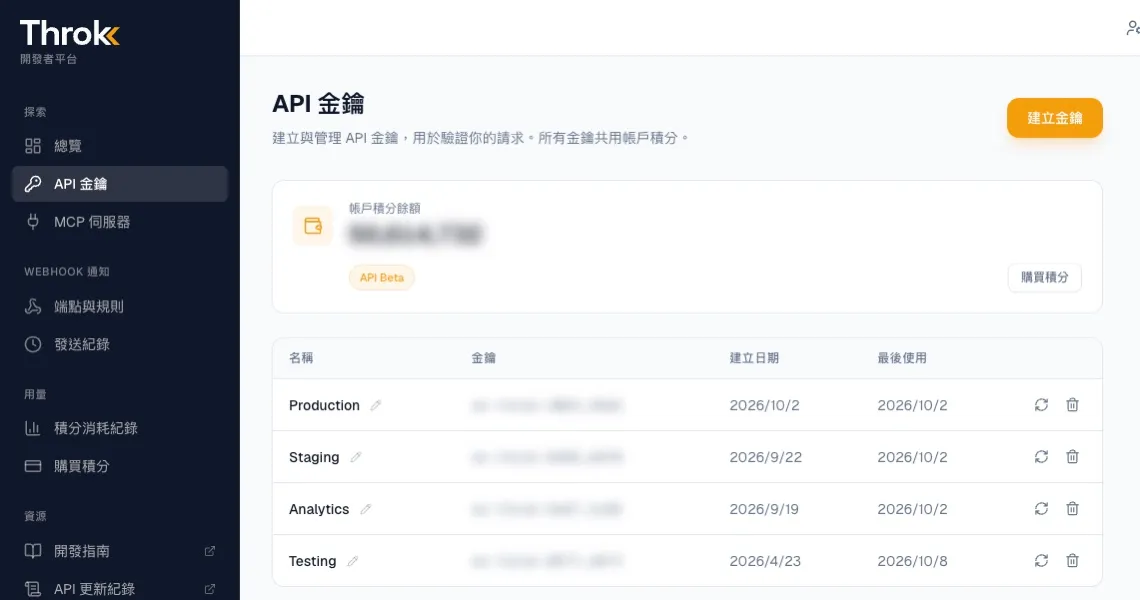
呼叫 API 需要有效的 API 方案;所有金鑰共用帳戶的積分。
2. 發出第一個請求
Section titled “2. 發出第一個請求”所有請求都送到 https://premium-api.throk.ai,並在標頭帶上 Authorization: Bearer <你的金鑰>。
下面這個請求會搜尋最近 24 小時內提到「減脂」的中文串文,依讚數由高到低排序,取前 10 筆:
curl -G 'https://premium-api.throk.ai/post/search' \ -H 'Authorization: Bearer sk-throk-...' \ --data-urlencode 'keywords=減脂' \ --data-urlencode 'max_age_hours=24' \ --data-urlencode 'sort=like:desc' \ --data-urlencode 'size=10'沒有指定 language 時,會搜尋所有中文串文(zh)。要查其他語言,請加上 language,例如繁體中文 language=zh-Hant、粵語 language=yue、英文 language=en、日文 language=ja,詳見串文語言。
回應(節錄):
{ "content": [ { "post": { "url": "https://threads.com/post/DaXXXXXX", "code": "DaXXXXXX", "caption": "減脂期間我都這樣吃……", "like_count": 1520, "reply_count": 48, "post_timestamp": 1790000000 }, "user": null } ], "metadata": { "total_count": 356, "current_page": 1, "page_size": 10, "total_pages": 36, "credits_consumed": 10 }}total_count 最多顯示 10,000:符合的串文超過 10,000 篇時,total_count 會停在 10,000,total_pages 也會跟著封頂。要看提及量,請用關鍵字趨勢。
3. 查看剩餘積分
Section titled “3. 查看剩餘積分”在開發者平台的總覽或 積分消耗紀錄頁面可以直接看到餘額與每一筆消耗。也可以用 API 查詢,不扣積分:
curl 'https://premium-api.throk.ai/balance' \ -H 'Authorization: Bearer sk-throk-...'{ "credits": 48210 }每次呼叫扣了多少積分,都會出現在回應的 credits_consumed 欄位。消費紀錄可以用 GET /balance/history 查詢。
| HTTP 狀態 | 訊息 | 原因 |
|---|---|---|
| 401 | Invalid API key |
金鑰打錯、已刪除,或標頭少了 Bearer 前綴 |
| 402 | Insufficient credits |
積分不足。系統會在查詢前先估算費用,積分不夠就不會執行 |
| 400 | 其他訊息 | 參數缺少、格式錯誤或超出範圍,訊息會寫出是哪個參數,例如時間超過允許的回溯天數 |
錯誤回應的格式一律是 {"detail": "錯誤訊息"}。
- 先讀搜尋規則,了解關鍵字怎麼比對,可以少走很多冤枉路。
- 想在 Claude、ChatGPT、Codex 或 Cursor 裡直接查資料,請看在 AI 助手中使用(MCP)。
- 想比較 API 方案與價格,請看 Throk API 方案。