
Threads API tutorial: Throk API quickstart
1. Get an API key
Section titled “1. Get an API key”Sign in to the Throk developer portal, open the API keys page and click Create key. Keys start with sk-throk-. Every example in these docs writes the key as sk-throk-...; replace it with your own key.
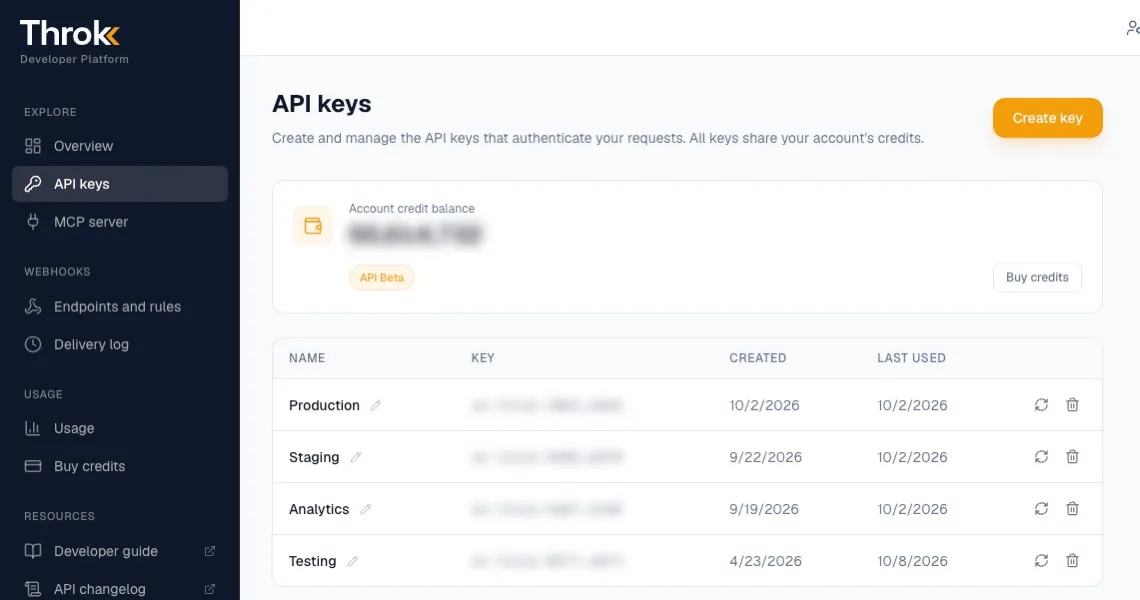
You need an active API plan to call the API. All keys share the account’s credits.
2. Send your first request
Section titled “2. Send your first request”Send every request to https://premium-api.throk.ai with the header Authorization: Bearer <your key>.
The request below searches Chinese posts from the last 24 hours that mention 減脂 (“fat loss”), sorts them by likes from high to low and returns the top 10:
curl -G 'https://premium-api.throk.ai/post/search' \ -H 'Authorization: Bearer sk-throk-...' \ --data-urlencode 'keywords=減脂' \ --data-urlencode 'max_age_hours=24' \ --data-urlencode 'sort=like:desc' \ --data-urlencode 'size=10'Without language, the search covers all Chinese posts (zh). To search another language, add language, for example language=zh-Hant (Traditional Chinese), language=yue (Cantonese), language=en (English) or language=ja (Japanese). See Post language.
Response (excerpt):
{ "content": [ { "post": { "url": "https://threads.com/post/DaXXXXXX", "code": "DaXXXXXX", "caption": "減脂期間我都這樣吃……", "like_count": 1520, "reply_count": 48, "post_timestamp": 1790000000 }, "user": null } ], "metadata": { "total_count": 356, "current_page": 1, "page_size": 10, "total_pages": 36, "credits_consumed": 10 }}total_count shows at most 10,000. When more than 10,000 posts match, total_count stops at 10,000 and total_pages is capped with it. To measure mention volume, use the keyword trend.
3. Check your remaining credits
Section titled “3. Check your remaining credits”The Overview and Usage pages in the developer portal show your balance and every charge. You can also check it with the API, which costs no credits:
curl 'https://premium-api.throk.ai/balance' \ -H 'Authorization: Bearer sk-throk-...'{ "credits": 48210 }The credits_consumed field in each response shows how many credits that call used. To list your usage history, call GET /balance/history.
Common errors
Section titled “Common errors”| HTTP status | Message | Cause |
|---|---|---|
| 401 | Invalid API key |
The key is mistyped or deleted, or the header is missing the Bearer prefix |
| 402 | Insufficient credits |
Not enough credits. Throk estimates the cost before running a query and won’t run it if your credits fall short |
| 400 | Other messages | A parameter is missing, malformed or out of range. The message names the parameter, for example when a time goes back further than allowed |
Error responses always use the format {"detail": "error message"}.
Next steps
Section titled “Next steps”- Read the search rules first. Knowing how keywords match saves a lot of trial and error.
- To query data directly in Claude, ChatGPT, Codex or Cursor, see Use in AI assistants (MCP).
- To compare API plans and prices, see Throk API plans.