
How to set up Throk webhooks: rules, payload format and signature verification
Webhooks save you from polling the API. Set up rules, and when a matching post appears on Threads, Throk sends the post data as a POST to the URL you choose. Common uses:
- Push to Slack, LINE or an internal system when your brand or product is mentioned and starts to gain traction
- Watch a topic for posts whose likes, replies or views pass a threshold
- Import posts that are going viral into your database or CRM automatically
How it works
Section titled “How it works”A webhook has two parts:
- Endpoint: the URL that receives notifications, for example
https://example.com/throk-webhook. Each endpoint has its own signing secret. - Rule: decides which posts to send. Each rule belongs to one endpoint, and an endpoint can have several rules.
Throk checks all rules every 3 minutes. Matching posts are sent to the endpoint as one event per post. The same post is sent only once per rule.
Rule types
Section titled “Rule types”Keyword rules
Section titled “Keyword rules”Sends a post when its text contains your keyword and it reaches your thresholds.
- One keyword per rule. Matching works the same as keyword search: Chinese matches character by character, English matches by word.
- Checks posts published in the last 24 hours.
- Set at least one threshold. The minimums are: likes ≥ 10, replies ≥ 5, views ≥ 20,000.
Trending threshold rules
Section titled “Trending threshold rules”No keyword. Sends any post published in the chosen window that reaches your thresholds. Use it to catch content that’s going viral.
- Checks posts published in the past 1–72 hours (set with
lookbackHours). - Set at least one threshold. The minimums are: likes ≥ 500, replies ≥ 100, views ≥ 20,000.
What both rule types share
Section titled “What both rule types share”- Thresholds within one rule are combined with AND: for example likes ≥ 100 and replies ≥ 10.
- Rules are independent: a post that matches two rules sends two events.
- You can filter by post language:
zh(all Chinese, the default),zh-Hant(Traditional Chinese),zh-Hans(Simplified Chinese),yue(Cantonese),ja(Japanese),ko(Korean). Each post’s own language decides, not where the author is;zhcoverszh-Hant,zh-Hansandyue. - Replies are included: replies can also trigger a rule. Use the
is_replyfield in the event to tell them apart. - View thresholds trigger later: a post’s view count usually isn’t available until a few hours after it’s published, so rules with a view threshold send later than rules that only check likes and replies.
Set up in the developer portal
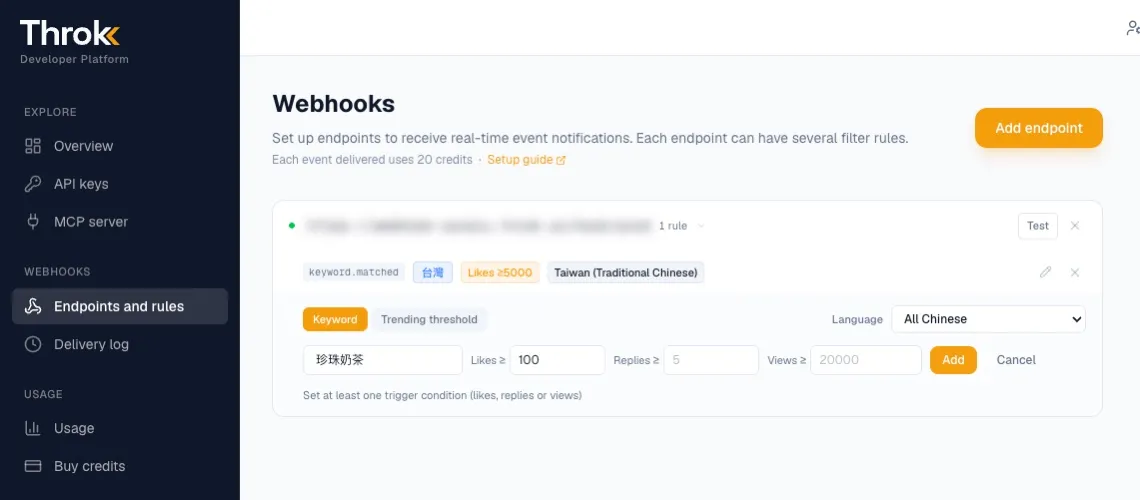
Section titled “Set up in the developer portal”- Sign in to the developer portal and open Endpoints and rules.
- Click Add endpoint, enter your URL and click Create.
- Under the endpoint, click + Add rule, choose Keyword or Trending threshold, set the language and thresholds (for trending thresholds, also set how many past hours to check), then click Add.
- Click Test on the endpoint to confirm your server receives events. You can test any time after creating the endpoint, without adding a rule first. Test events cost no credits.
- Expand the endpoint to see its Signing secret, which you use to verify signatures.
Every event sent and the response status from your server are listed on the Delivery log page, where you can resend failed events.
Set up with the API
Section titled “Set up with the API”You can also manage endpoints and rules with the API. Every request needs your API key.
| Method and path | Purpose |
|---|---|
GET /webhook/endpoints |
List your endpoints, signing secrets (secret) and rules |
POST /webhook/endpoints |
Create an endpoint |
DELETE /webhook/endpoints/{endpoint_id} |
Delete an endpoint (and all of its rules) |
POST /webhook/endpoints/{endpoint_id}/rules |
Create a rule under an endpoint |
DELETE /webhook/rules/{rule_id} |
Delete a rule |
POST /webhook/endpoints/{endpoint_id}/test |
Send a test event (free) |
Create an endpoint:
curl -X POST 'https://premium-api.throk.ai/webhook/endpoints' \ -H 'Authorization: Bearer sk-throk-...' \ -H 'Content-Type: application/json' \ -d '{"url": "https://example.com/throk-webhook"}'Create a keyword rule (Traditional Chinese posts with likes ≥ 100):
curl -X POST 'https://premium-api.throk.ai/webhook/endpoints/{endpoint_id}/rules' \ -H 'Authorization: Bearer sk-throk-...' \ -H 'Content-Type: application/json' \ -d '{"keyword": "珍珠奶茶", "likeCount": 100, "language": "zh-Hant"}'Create a trending threshold rule (posts from the past 6 hours with likes ≥ 1,000):
curl -X POST 'https://premium-api.throk.ai/webhook/endpoints/{endpoint_id}/rules' \ -H 'Authorization: Bearer sk-throk-...' \ -H 'Content-Type: application/json' \ -d '{"likeCount": 1000, "lookbackHours": 6}'Rule fields:
| Field | Description |
|---|---|
keyword |
The keyword. Leave it out for a trending threshold rule |
likeCount, replyCount, viewCount |
Likes, replies and views thresholds. Set at least one |
lookbackHours |
Check posts published in the past N hours, 1–72. Required for trending threshold rules. Keyword rules always check the last 24 hours and can’t set it (returns 400) |
language |
Post language: zh, zh-Hant, zh-Hans, yue, ja, ko (case-insensitive). Default zh. Responses always use these spellings |
Field names also accept snake case, such as like_count or lookback_hours. Responses always use the names in the table above.
Rules can’t be edited. To change one, delete it and create it again (the developer portal lets you edit directly).
Payload format
Section titled “Payload format”Each event is sent to your endpoint as a POST with a JSON body:
{ "post": { "url": "https://threads.com/post/DXZoK1VlEvT", "code": "DXZoK1VlEvT", "caption": "串文內容……", "is_reply": false, "like_count": 1700, "reply_count": 293, "repost_count": 40, "reshare_count": 180, "impression_count": 254300, "post_timestamp": 1776760127, "media_url": ["https://media01.throk.ai/media/..."] }, "user": { "username": "throk.ai", "full_name": "Throk|定義 Threads 數據新標準", "profile_picture": "https://media01.throk.ai/profile/77928681697.jpg" }, "rule": { "id": "9b2f6c1e-…", "type": "keyword", "keyword": "珍珠奶茶" }}- The numbers are a snapshot at the time of sending. If the post keeps growing, no update is sent.
repost_countincludes reposts and quotes.impression_countisnullwhen no view data is available yet.ruleis the rule that triggered the event:idis the rule ID (the same one returned when you created the rule),typeiskeyword(keyword rule) ortrending(trending threshold rule), andkeywordisnullfor trending threshold rules. When a post matches several rules, each rule sends its own event.- For test events,
ruleis{"id": "test", "type": "test", "keyword": null}, so you can tell them apart from real events.
Verify signatures
Section titled “Verify signatures”Every event is signed, so you can confirm the request really came from Throk and wasn’t tampered with.
- See the signing secret by expanding the endpoint in the developer portal, or get it from the
secretfield in theGET /webhook/endpointsresponse. - The signature is in the
X-Throk-Signaturerequest header, in the formatt=<UNIX timestamp>,v1=<signature>. - To verify: compute HMAC-SHA256 (hex) of
<timestamp>,<raw request body>with the signing secret as the key, and compare it withv1. Also check that the timestamp is within a few minutes, to block replay attacks.
Node.js example:
import crypto from 'node:crypto';
// rawBody: the raw request body (string), header: the value of X-Throk-Signaturefunction verify(rawBody, header, secret) {  const fields = header.split(',').map((p) => p.split('='));  const t = Number(fields.find(([k]) => k === 't')?.[1]);  if (!t || Math.abs(Date.now() / 1000 - t) > 300) return false; // only accept requests from the last 5 minutes  const expected = Buffer.from(    crypto.createHmac('sha256', secret).update(`${t},${rawBody}`).digest('hex'),  );  // during secret rotation there may be several v1 values; any match is valid  return fields    .filter(([k]) => k === 'v1')    .some(([, sig]) => {      const got = Buffer.from(sig);      return got.length === expected.length && crypto.timingSafeEqual(got, expected);    });}
Compute it from the raw request body. Don’t parse it as JSON and turn it back into a string first.
Notes for your receiving server
Section titled “Notes for your receiving server”- Respond with HTTP 2xx as fast as you can. Move slow work to the background.
- Events that don’t get a 2xx response are retried automatically with exponential backoff, up to 10 times. You can also resend them by hand from the Delivery log page in the developer portal.
- Each endpoint receives at most 1,000 events per 60 seconds. Anything over that is delayed.
- Real events carry an
X-Convoy-Idempotency-Keyheader (test events don’t). Its value stays the same when an event is retried, so use it (or the post’scode) to deduplicate and avoid processing an event twice.
Pricing
Section titled “Pricing”- Each event sent costs 20 credits, from the same account credits as API calls. The same post is charged only once per rule. The charge applies when the event is sent, whether or not your server responds successfully, so make sure your endpoint can receive events.
- Creating and deleting endpoints and rules, and test events, cost no credits.
- When you run out of credits, events pause. After you top up, posts still within the check window are sent in the next round.
- If you downgrade to a plan without webhooks, your existing rules are kept but no longer trigger.
- Webhook usage appears on the Usage page with the API type
webhook.
Turning webhooks off
Section titled “Turning webhooks off”There’s no pause switch. To stop deliveries, delete the rules or the endpoint. Deleting an endpoint also deletes all of its rules.
For an overview of webhooks and which plans include them, see Throk Webhooks.