
How credits work in the Throk web app: plans and usage
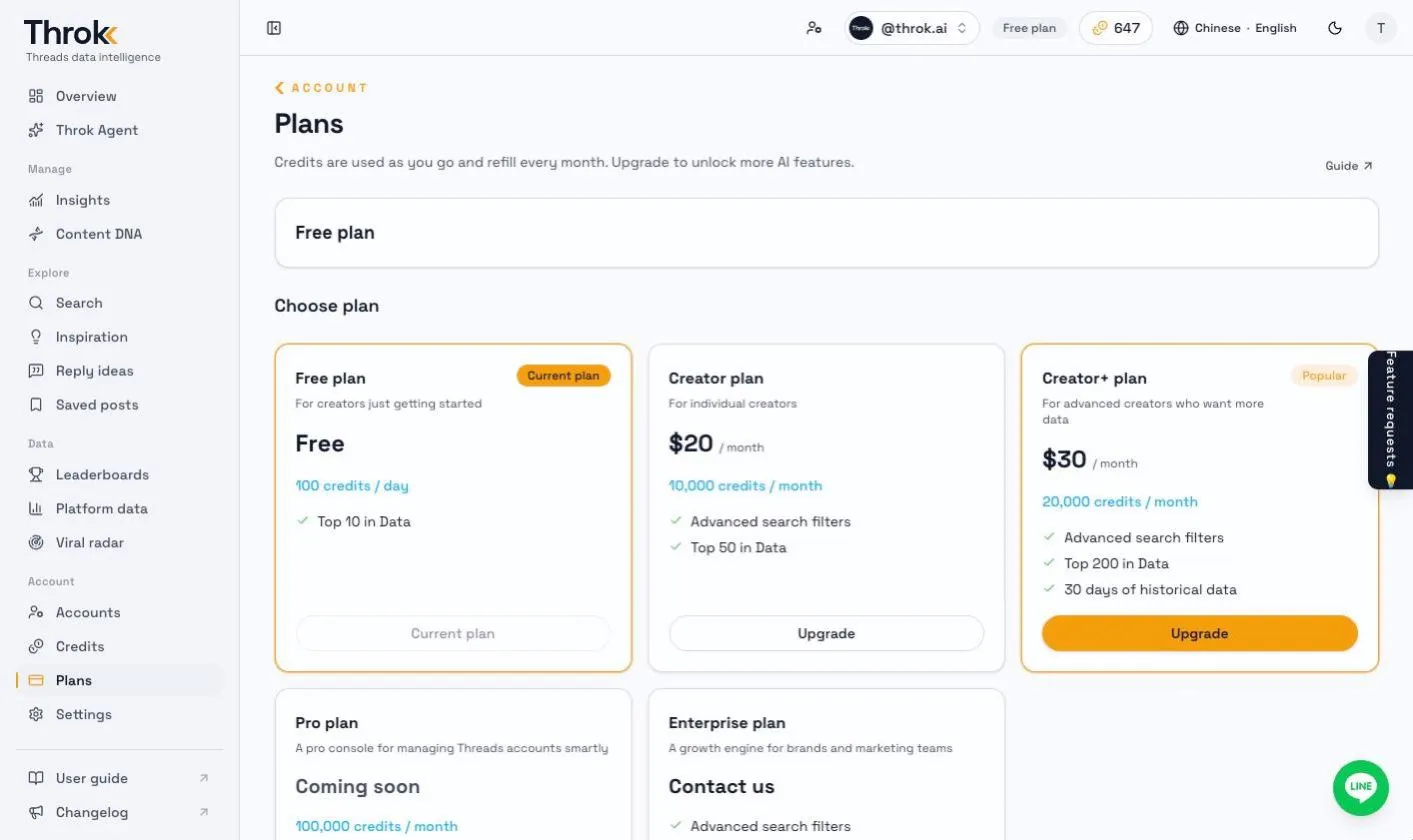
| Plan | Price | Credits | Data rankings | Past dates |
|---|---|---|---|---|
| Free plan | Free | 100 per day | Top 10 | — |
| Creator plan | US$20 / month | 10,000 per month | Top 50 | — |
| Creator+ plan | US$30 / month | 20,000 per month | Top 200 | 30 days |
| Pro plan | Coming soon | 100,000 per month | Top 200 | 60 days |
| Enterprise plan | Contact us | Custom | Top 500 | 90 days |
- Data rankings: How many places you can see on pages such as Leaderboards and Viral radar. On the Free plan you can see the top 10 trending posts and the top 5 on other leaderboards.
- Past dates: Pick a past date on Leaderboards to see that day’s rankings.
- Search: The Free plan always searches the last 7 days and can’t use the Likes, Replies or Author followers filters. Paid plans can pick any dates within the last 30 days and use every filter.
- After you sign in, the Plans page shows the full feature comparison. That page and the Throk pricing page are the source of truth for what each plan includes.
Paid plans are priced in US dollars, billed monthly and paid through Stripe.
How credits are used
Section titled “How credits are used”Only two features use credits:
| Feature | Cost |
|---|---|
| Search | 1 credit per result, or 2 credits when you filter by author followers. If fewer results come back, the difference is refunded automatically |
| Throk Agent | Charged per question based on the model. Refunded if the run fails |
Leaderboards, Platform data, Viral radar, Inspiration, Reply ideas and account analysis don’t use credits, but how much you can see depends on your plan.
The Credits page shows:
- Plan credits, top-up credits and total credits
- Usage history: every charge and refund. Click a search entry to go straight back to its results
7-day free trial
Section titled “7-day free trial”You can try the Creator plan and Creator+ plan free for 7 days:
- A credit card is required. The trial includes 1,000 credits.
- Each user can start one trial. Accounts that already have a paid plan can’t start a trial.
- When the trial ends, it automatically becomes a paid subscription. If you don’t want to continue, cancel before the trial ends.
- During the trial, you can click Start subscription now to switch to the paid plan early.
Manage your subscription
Section titled “Manage your subscription”On the Plans page, click Manage plan & billing to open the Stripe billing page, where you can change your payment method, download receipts or cancel your subscription.
To delete your Throk account, cancel your paid plan first, then delete the account under Settings › Throk account.