
How to contact Throk support (AI support and the Throk team)
Open the support chat
Section titled “Open the support chat”Sign in to the Throk web app or the developer portal and click the Throk button in the bottom-right corner. The conversation belongs to your Throk account, so you see the same chat on every device and site. You can also reach us on LINE with the LINE button at the top of the chat.
AI support
Section titled “AI support”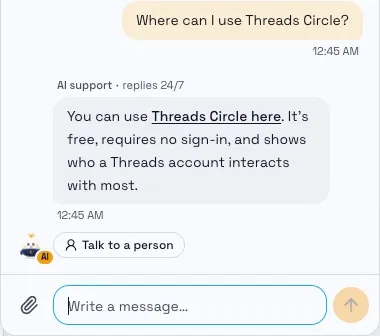
AI support replies 24/7. Ask about:
- Your account, plans, credits and the 7-day free trial
- How to use the web app and the free tools
- Getting started with the Throk API and MCP
AI support can see your current plan, trial and credits, so you don’t need to give your email. Its replies are labelled AI support and have an AI tag on the avatar; replies from the team show the teammate’s name.
Talk to a person
Section titled “Talk to a person”Click Talk to a person under an AI reply, or just tell AI support you want a person. The chat moves to the Throk team and a teammate replies in the same conversation. A person stays on it until it’s solved; after that, your next question is answered by AI support first.
AI support also passes the chat to the team for payment problems, account changes only the team can make, bug reports and partnership enquiries.
What AI support doesn’t do
Section titled “What AI support doesn’t do”- Analyse Threads data or write posts: use Throk Agent in the web app.
- Change plans, handle payments or delete accounts: see Plans and credits for plans, the trial and cancelling; delete your account under Settings › Throk account.
A post or account has no data
Section titled “A post or account has no data”Throk’s data comes from public Threads data, collected for broad, platform-wide coverage. A specific post or account not being included is expected and doesn’t mean anything is wrong with your account. Send support the post link or the account, and we can check it with the data source.